

Human vs. AI Agent:
How to measure?
How Web & App Analytics Works
What Happens When a User Visits?
Analytics only knows what happens inside the browser. The browser requests the page, runs JavaScript, the SDK loads, and only then does data collection begin.
User opens browser
  → Browser requests page from server
  → HTML + JavaScript downloaded and rendered
  → Analytics SDK loads
  → User interactions captured
  → Data sent to analytics server
If JavaScript does not run, that visit is never recorded.
How Event Tracking Works
Once the SDK loads, a developer calls a function at key moments. That creates an event, packaged and sent to the analytics server.
// User clicks "Buy Now":
analytics.track("button_clicked", {
  page: "/pricing",
  button: "buy_now",
  user_id: "u_4821"
})
// POST https://collect.analytics.io/v1/events
// { event, timestamp, session_id, device, ... }Mobile App Measurement
The SDK is bundled inside the app binary. It initialises on open, tracks events, and flushes data periodically.
// Purchase completed in-app:
sdk.logEvent("purchase_completed", {
  item_id: "SKU-991",
  value: 49.99,
  currency: "USD"
})- Auto-collected: App open, screen view, session end, crashes
- Custom events: Checkout, registration, feature usage
- Attribution: Campaign to install mapping, handled as a separate layer
Server-to-Server Measurement
Events sent directly from your backend. No browser involved. Used when client-side data cannot be trusted, or there is no browser at all.
// From your server to the analytics API:
fetch("https://analytics-api.io/v1/events", {
  method: "POST",
  body: JSON.stringify({
    event: "subscription_renewed",
    user_id: "u_4821",
    revenue: 99.00
  })
})
The server sees every request, whether JavaScript ran or not. This is the foundation for detecting AI traffic.
How AI Browses the Web
Who Is Actually Visiting Your Site?
Content crawlers — index and collect, do not interact:
| Type | What they do | Identify themselves? |
|---|---|---|
| Search engine bots | Index pages, follow robots.txt | Always |
| AI training bots | Scrape content for LLM datasets | Usually |
Autonomous agents — act on behalf of users, harder to detect:
| Type | What they do | Identify themselves? |
|---|---|---|
| Headless browsers | Full rendering, automated tasks | Rarely |
| Autonomous agents | Clicks, forms, purchases | Almost never |
llms.txt
Three files now guide different automated systems visiting your site:
| File | Who it talks to | What it does |
|---|---|---|
robots.txt | Search crawlers | Access control |
sitemap.xml | Search crawlers | Map of all indexable pages |
llms.txt | AI language models | Curated list of important content |
# llms.txt example
# Acme Corp
> Project management for remote teams.
## Key Pages
- [Product](https://example.com/product): What we build
- [API Docs](https://example.com/docs): Technical reference
Stripe, Cloudflare, Zapier, Anthropic already publish this file. Still emerging, not yet enforced.
How an Agent Sees a Page
Human User
- Browser fully renders the page
- JavaScript executes
- Analytics SDK loads and sends data
- Mouse, scroll, clicks recorded
- Cookie and session carried over
AI Agent (simple fetch)
- Sends a raw HTTP request
- JavaScript usually does not run
- Analytics SDK never loads
- No interaction, just data extraction
- No cookie or session context
Agents using a headless browser do run JavaScript and can look identical to a real user in analytics. Example.
Why Standard Analytics Cannot See This
What Analytics Cannot See
| Traffic type | Analytics sees it? | Why |
|---|---|---|
| Real user, real browser | Yes | JS runs, SDK fires |
| Headless browser (JS on) | Misidentified as human | JS runs, no bot signal |
| Simple HTTP fetch (no JS) | No | SDK never loaded |
| Direct API scraping | No | Never touched browser layer |
Your dataset either excludes AI traffic entirely, or contains it mixed in with human traffic, unlabelled.
Reading Server Logs
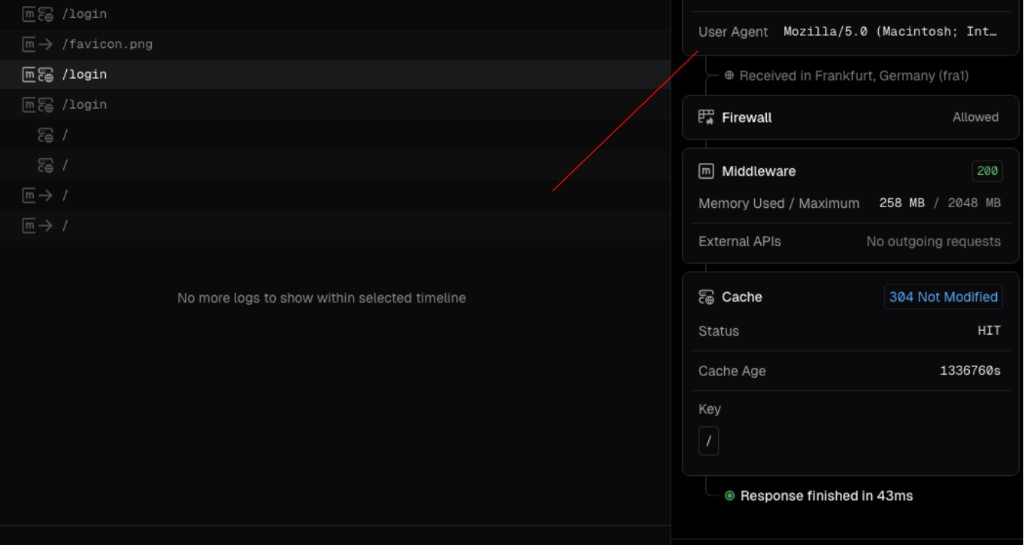
Server logs are written before any JavaScript runs. Every request appears here.
// A raw server log line:
34.90.12.55 [16/Apr/2026 09:14:02] "GET /pricing" 200 "-" "GPTBot/1.0"

34.90.12.55   → IP address (cloud server?)
GET /pricing  → Which page was accessed
"-"           → No referrer (bot signal)
"GPTBot/1.0" → Declared bot identity
Most reliable first source for bot detection, independent of the browser.
Reading Server Logs
Vercel example logs.
Bots That Identify Themselves
| Identity | Owner |
|---|---|
GPTBot/1.0 | OpenAI |
ClaudeBot | Anthropic |
PerplexityBot | Perplexity |
CCBot/2.0 | Common Crawl (LLM training data) |
Meta-ExternalAgent | Meta |
python-requests/2.x | Unknown, anonymous script |
Some bots use a normal browser identity. Checking only this field is not sufficient.
Other Detection Signals
- IP address: Cloud infrastructure (AWS, GCP, Azure) is frequently bot-originated. Real users from here.
- No cookie: Real users carry a session from previous visits. Bots usually start fresh.
- No referrer: Humans arrive by clicking a link. Bots go directly to a URL.
- No JavaScript event: The server delivered the page, but no analytics event arrived. The browser likely never rendered it.
Server-Side Solutions
Server-Side Measurement
Route all events through your own infrastructure first. Classify before anything reaches a vendor.
Browser / App
      ↓
Your Server  ← sees IP, identity, cookie, everything
      ↓
  Human traffic  →  Analytics
Bot traffic → Separate log- Every request is visible, independent of whether JavaScript ran
- Clean separation before data reaches any analytics platform
The Web Interface Is Changing
Key Takeaways
Thank you
berkay.fyi
hard.al